Mitsubishi A6M3 Reisen, Zero
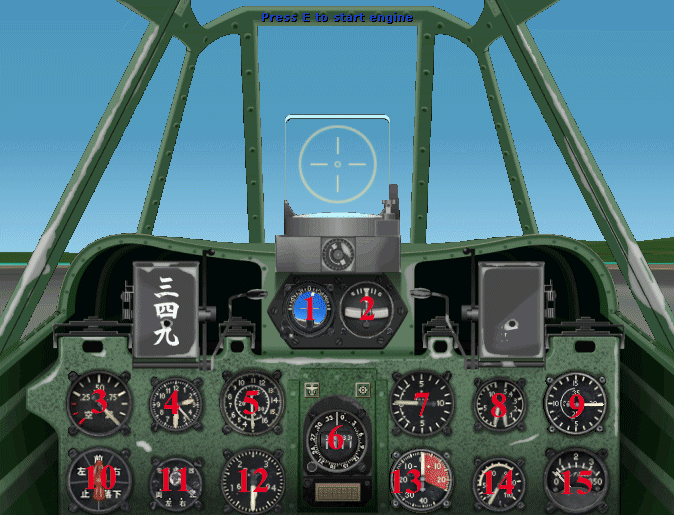
 1. Attitude Indicator                      2. Turn and Bank Indicator
 3. Fuel Tank Level Indicator               4. Clock
 5. Airspeed Indicator                      6. Magnetic Compass inside, and
                                               Gyrocompass on the outer scale
 7. Vertical Speed Indicator                8. Oil Pressure(L) and Fuel Pressure(R)
 9. Tachometer                             10. Fuel Tank Selector
11. Engine Ignitionn and Magnetos Switch   12. Altimeter
13. Manifold Pressure Boost                14. Oil Temperature
15. Cylinder Head Temperature
Mitsubishi A6M3 Reisen, Zero
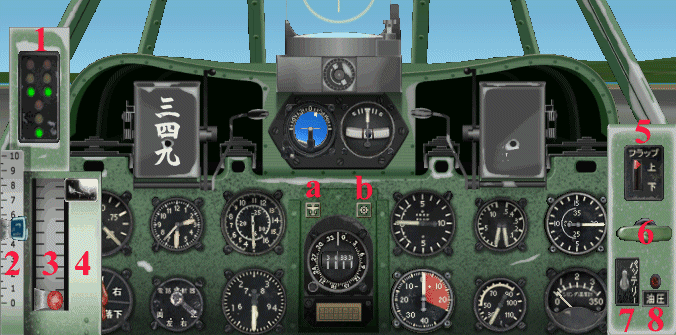
 1. Landing Gear Position Lights            2. Throttle Control
 3. Mixture Control                         4. Propeller Control
 5. Flaps Switch                            6. Engine Start Switch
 7. Master Switch                           8. Hydraulic Pressure

 a. Toggle to ON/OFF the Throttle Quadrant  b. Toggle to ON/OFF the Flight Map